Roblox Trusted Friends Explained: Why Connections Is Gone and How the New Chat Rules Work
Roblox quietly reversed its 2025 rename of Friends to Connections in April 2026, bringing back the Friends label while keeping the expanded Trusted Friends system built around it. Here's how adding a Trusted Friend, the parental approval process for kids under 13, and Roblox's related privacy controls actually work today.
Roblox has renamed its social graph twice in less than a year. In July 2025 the platform swapped "Friends" for "Connections" and introduced an age-gated "Trusted Connections" tier. In April 2026, Roblox reversed the name change, bringing "Friends" back and rebranding Trusted Connections as Trusted Friends — while keeping the underlying safety mechanics the rename was built around. If you've opened Roblox recently and wondered why the menu looks different from a screenshot you saw last year, or why some friends show a "Trusted" badge in chat, here is what actually changed and how the current system works.
This explainer covers the terminology flip, what a Trusted Friend unlocks, how to add one with a QR code or contact import, and the parental-approval steps required for users under 13 — all drawn from Roblox's own Developer Forum posts and support documentation.
1. A Quick History: Friends, Then Connections, Now Friends Again
Roblox originally announced the Friends-to-Connections rename on July 17, 2025, alongside a new safety push built around facial age estimation (covered in detail in our breakdown of how Roblox's facial age estimation actually scans and verifies your age). Age-checked users 13 and older could unlock "Trusted Connections" — people they confirmed as real-life friends or family — for unfiltered chat and party voice.
That branding lasted about nine months. On April 2, 2026, Roblox posted "Friends Are Back! Expanding Trusted Friends for a New Way to Chat and Play" on its Developer Forum, reverting the name across the app. Roblox's own explanation was simple: the change was about "getting back to the language people use in their everyday lives." Trusted Connections became Trusted Friends, with the same purpose — Roblox describes it as "a special designation for a user's inner circle of close friends and family."

For creators, Roblox confirmed there were no API changes — only a cosmetic rename. If your experience has custom UI text that still says "Connections" or "Trusted Connections," Roblox's own recommendation is to update it to "Friends" and "Trusted Friends" to match the live app.
Same Mechanism, New Label
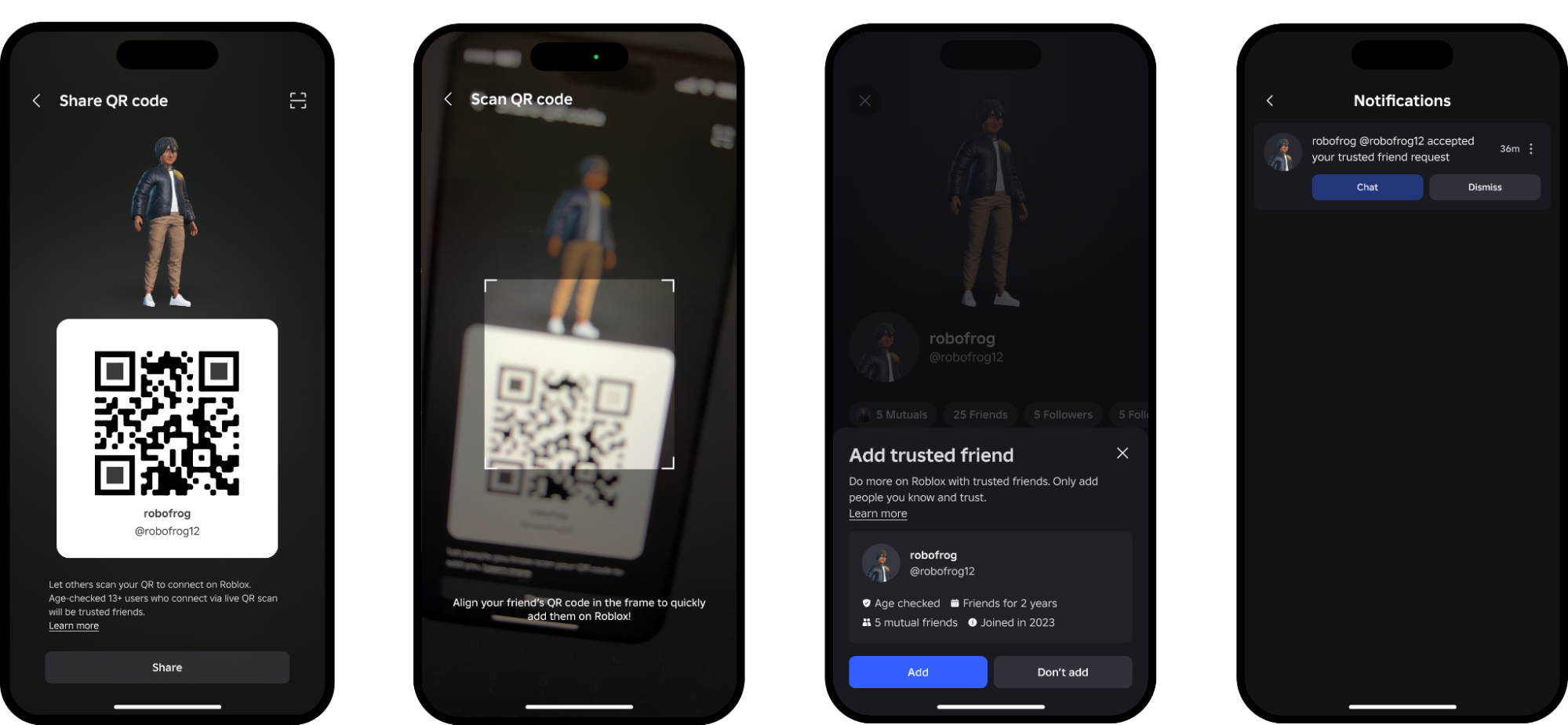
The method for adding a Trusted Friend hasn't changed since 2025: a live QR code scan or an import of your phone's contacts, both meant to confirm you actually know the other person outside of Roblox.

2. What a Trusted Friend Unlocks
A regular Friend on Roblox is just someone on your friends list. A Trusted Friend is a smaller, confirmed circle that unlocks extra features once both of you are age-checked:
- Chat across age groups — normally Roblox limits who can chat with whom based on estimated age, but Trusted Friends can talk even if they fall into different age tiers.
- A visible "Trusted" label on profile pages and in experience chat, so you can tell at a glance who's in your inner circle.
- Party voice and less-filtered chat with that specific person, carried over from the original Trusted Connections feature.
Roblox is explicit that this isn't a one-way or permanent status: becoming Trusted Friends requires mutual agreement, and either person can downgrade the relationship back to a regular friendship at any time. Roblox also states that it proactively monitors all communication between Trusted Friends — the looser filters don't mean the conversation goes unmonitored.
3. How to Add a Trusted Friend (Ages 13 and Up)
To add or become a Trusted Friend, both accounts generally need to be age-checked — the same facial age estimation or ID verification process Roblox uses to sort accounts into age groups. From there, the process is:
- Open your friend's profile, or scan their live QR code / share your own from the Friends tab.
- Confirm the request — Roblox shows mutual friends, how long you've been connected, and when the other account joined, to help you verify it's really someone you know.
- Once accepted, the relationship shows as "Trusted" on both ends, and you'll get a notification confirming it.
Roblox also began rolling out a broader option shortly after the April 2026 update: age-checked users 13 and older can add younger siblings, cousins, or school friends as Trusted Friends, provided a parent approves the request first.
4. Parental Approval for Users Under 13
Accounts belonging to kids under 13 can't accept a Trusted Friend request on their own. Instead, the request goes to a linked parent account through Roblox's Parental Controls:
- The parent receives a notification or email asking them to review the request, with a link that expires after 24 hours.
- The parent sees the other account's age group, mutual friends, and how long the two accounts have been friends before deciding whether to allow it.
- If the other account is also under 13, that child's parent has to approve the request too — both sides need sign-off.

Chat defaults also scale with age, independent of Trusted Friend status: accounts under 9 have chat switched off by default (Roblox has said parents will be able to turn it on for Trusted Friends specifically through Parental Controls), accounts aged 9 to 12 get filtered chat with Trusted Friends and similarly aged peers by default, and parents of 13-to-17-year-olds can view their teen's Trusted Friends list from the parental dashboard. For the full rundown of every toggle in that dashboard, Roblox Parental Controls in 2026 covers screen time, spending limits and chat settings in detail.
One convenience worth knowing about: if a parent's own account is already age-checked and was already a regular Friend of their child before this update, Roblox automatically upgrades that relationship to Trusted Friend — no separate request needed.
5. Privacy and Notification Controls Worth Checking
Alongside the Friends changes, Roblox's Settings menu holds a few privacy tools that are easy to miss and apply regardless of who you're friends with:
- Visibility controls under Privacy & Content Restrictions let you choose who can see your online status and current experience — options range from Everyone down to No One.
- Do Not Disturb lets you set a daily window where push notifications stay silent, useful for keeping a device quiet overnight.
- Screen-time insights show how long you've spent on Roblox and which experiences you've played the most, directly inside Account Settings.

None of these require a Trusted Friend relationship to use — they're available to every account and worth a look even if you have no interest in the Friends-versus-Connections history.
6. What It Means Going Forward
The back-and-forth naming is a reminder that Roblox treats its safety systems as a work in progress rather than a fixed feature. Roblox CEO David Baszucki has repeatedly pointed to platform safety as a priority area in recent public comments, including his recent interview with Bloxy News, so further adjustments to how Friends, Trusted Friends, and age groups interact shouldn't come as a surprise. For now, the practical takeaway is simple: the feature you may remember as "Connections" is "Friends" again, "Trusted Connections" is "Trusted Friends," and the QR-code-or-contacts method for building that trusted circle hasn't changed at all.
Quick Recap
- Roblox reverted "Connections" back to "Friends" on April 2, 2026; "Trusted Connections" is now "Trusted Friends."
- Trusted Friends can chat across age groups and show a "Trusted" badge; the relationship requires mutual agreement and can be downgraded anytime.
- Add a Trusted Friend via a live QR code scan or contact import — both accounts generally need to be age-checked.
- Under-13 accounts need parental approval through Parental Controls, and if both users are under 13, both parents must approve.
- Check Settings for separate Visibility, Do Not Disturb, and screen-time insight controls that apply to every account.
Official Resources
- Roblox Developer Forum: "Friends Are Back! Expanding Trusted Friends for a New Way to Chat and Play"
- Roblox Developer Forum: "Connecting with Confidence on Roblox" (original 2025 announcement)
- Roblox Newsroom: "Revolutionizing Digital Connection: Roblox's Vision for Age-Based Communication"
For more on how Roblox's broader safety tools fit together, or to find a guide for another game entirely, browse the full walkthroughs.net game guide library.