Roblox Account Security Explained: Two-Step Verification, Enhanced Protection and How to Avoid Getting Hacked

Roblox account theft almost always comes down to stolen passwords, phished login codes or a hijacked ROBLOSECURITY cookie — not a hacked server. Here's how Roblox's Two-Step Verification, the second-device login challenge, Enhanced Protection and Account Session Protection actually work, and the exact steps to take if your account is ever compromised.
Your Roblox account is worth more than it looks. Between Robux, limited items, game progress and years of friends lists, a stolen account can mean real financial loss — and account theft is one of the most common ways Roblox players actually get hurt on the platform, far more often than anything that happens inside a game. Roblox has built out a real stack of account security tools over the past few years, from basic two-step verification to a passkey-only "Enhanced Protection" tier, but none of it helps if the settings stay switched off.
This guide covers every layer of Roblox account security that currently exists, how attackers actually get into accounts in the first place, and the concrete steps to lock yours down.
1. Why Roblox Accounts Get Targeted
Robux and limited items have real resale value on third-party trading markets, which makes Roblox accounts a genuine target for theft rather than just vandalism. A compromised account can be stripped of its inventory, used to scam a victim's friends list, or held for ransom. Younger players are especially exposed because they're more likely to trust a message claiming to be from "Roblox Support" or a friend offering a trade that's too good to be true. None of this requires an attacker to be technically sophisticated — most account theft comes down to tricking a person, not breaking encryption.
2. Start With the Basics: A Unique Password and a Verified Email
Every other security layer on Roblox builds on top of two things: a password that isn't reused anywhere else, and a verified email address on the account. A verified email matters for more than login — Roblox's own account-recovery policy requires two distinct verification methods before it will hand an account back to you, and a confirmed email is the simplest one to have ready. Add or confirm an email from the Account Info tab inside Settings before touching anything else.
3. Two-Step Verification: Email Codes and Authenticator Apps
Standard Two-Step Verification (2SV) adds a one-time code challenge on top of your password at login, account recovery, and high-value transactions. Roblox's Security tab lets you choose one of two standard methods: a code emailed to your verified address, or a time-based code generated by an authenticator app such as Google Authenticator, Microsoft Authenticator or Authy, set up once and scanned in from Settings > Security. Only one standard method can be active at a time — turning on the authenticator option replaces email codes, not adds to them.
4. Login Challenges: Approving Sign-Ins From a Trusted Device
Since 2024, Roblox has backed up standard 2SV with a second-device challenge that fires automatically when a login looks suspicious, even on accounts that haven't turned on 2SV at all. If Roblox's systems flag a sign-in attempt, you'll get a prompt on a phone or tablet that's already logged into your account, showing the device type, approximate region, IP address, and the date and time of the attempt — and you choose whether to approve or reject it. The Safety Team's own guidance is to keep a verified email and a saved set of backup codes on the account, since those are the fallback if the trusted device isn't available when a challenge comes in.
5. Enhanced Protection: Roblox's Strongest Security Tier
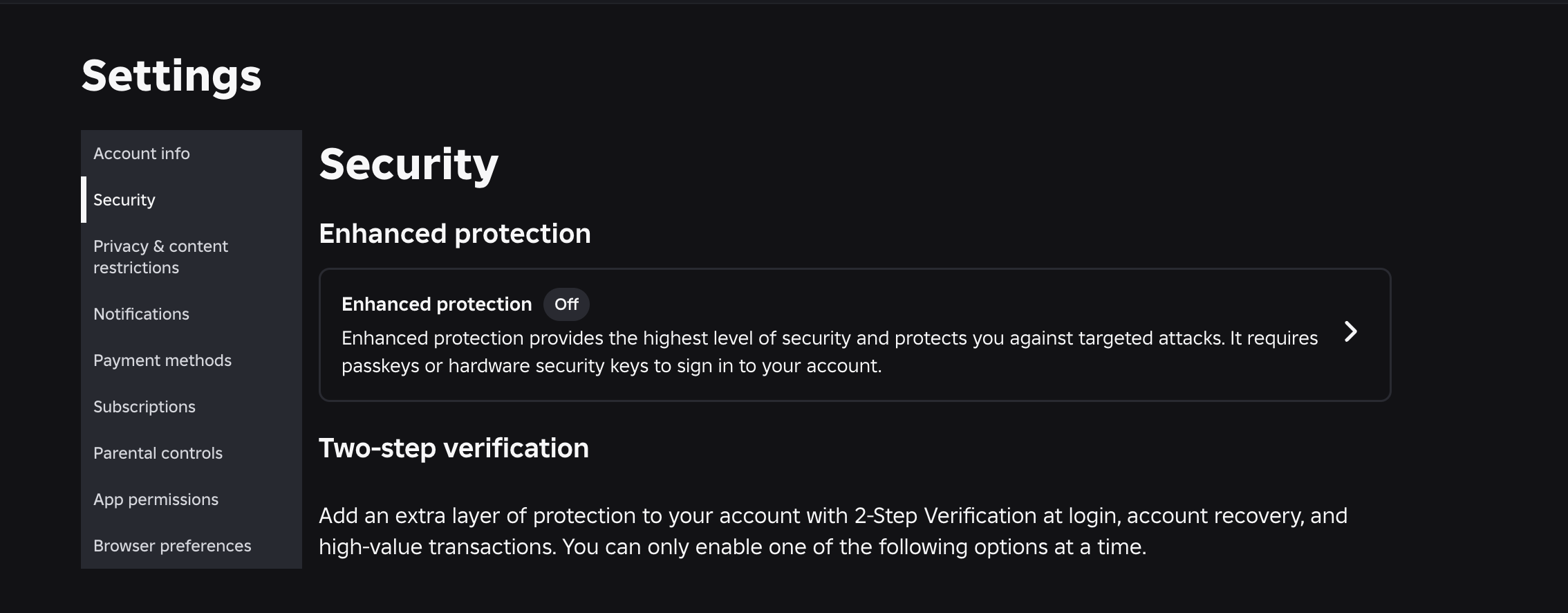
In April 2026, Roblox introduced Enhanced Protection, described by its Safety Team as the most secure version of 2-Step Verification the platform offers, built specifically to stop "point-of-authentication" attacks like phishing and credential stuffing rather than just adding another code to type in. Turning it on changes how sign-in works across the board: passkeys become the primary way to log in and clear 2SV challenges, existing hardware security keys (like YubiKeys) keep working, and — critically — email one-time codes and authenticator app codes stop being accepted for 2SV challenges entirely. If your account still uses a password to sign in, you'll be asked to clear a passkey or hardware-key challenge as well.
Roblox recommends Enhanced Protection specifically for top creators and anyone holding a large Robux balance. Before you can turn it on, the account needs at least one passkey or registered hardware security key, a verified email, and either a verified phone number or a saved set of backup codes — Roblox requires that second pair deliberately, so a lost or damaged passkey still leaves two distinct ways to recover the account rather than a single point of failure.
6. How Account Theft Actually Happens: Cookie Theft and Phishing
Most real-world Roblox account theft doesn't "crack" a password or a 2SV code at all — it steals the ROBLOSECURITY session cookie that keeps you logged in, which can bypass both your password and two-step verification if an attacker gets hold of it. Roblox's own breakdown of the problem lays out the usual paths: pasting the cookie into a non-Roblox site (often disguised as a "free Robux" or "game stats" tool), clicking a malicious link or downloading a file that extracts it, or installing a browser extension that turns out to be hostile. Once an attacker has that cookie, they can log in as you directly, no password or code required.

Roblox's answer is Account Session Protection, rolled out platform-wide starting January 15, 2024, which ties your account's session cookie to the specific device it was issued on. With it active, a stolen ROBLOSECURITY cookie simply doesn't work anywhere else — the core defense is to make the cookie itself useless to a thief, rather than relying on you never making a mistake. The one rule that never changes: never paste your ROBLOSECURITY value into any site, tool or Discord bot that isn't roblox.com, no matter what it promises.
7. Recognizing Common Roblox Scams
A large share of account theft starts with a scam, not a technical exploit. A few patterns to watch for:
- "Free Robux" generators and websites. There is no legitimate way to generate Robux outside of buying it on roblox.com or earning it through Roblox's own creator and affiliate programs. Every site or video claiming otherwise is designed to harvest your login or your cookie.
- Trade and item scams. Limited items are valuable enough to attract fake "upgrade" trades and middleman scams — worth reading alongside a dedicated breakdown of how Roblox's trading and limiteds market actually works before trading anything valuable.
- Fake Roblox Support messages. Real Roblox staff will never ask for your password, your ROBLOSECURITY cookie, or a 2SV code over chat, email or Discord. Any message asking for one of those is a scam, regardless of how official it looks.
- Browser extensions promising cosmetics or stats. Third-party extensions that claim to unlock avatar items, show "real" trade values or reveal visitor stats are a common vector for the exact cookie theft described above.
8. What to Do If You Think Your Account Is Compromised
Act in this order: change your password immediately from a device you trust, then use the Security tab in Settings to sign out of all other active sessions — this cuts off a stolen cookie or an attacker's active login even if you don't know how they got in. From there, turn on (or rotate) Two-Step Verification or Enhanced Protection, check your email and linked accounts for any changes you didn't make, and report the incident to Roblox Support through the official site so their team can review account activity on their end. Don't wait to see if the problem "goes away" — a session that's still open is a session an attacker can keep using.
Quick-Tips Recap
- Use a unique password and a verified email — both are prerequisites for everything else.
- Turn on standard Two-Step Verification (email or authenticator app) from Settings > Security.
- Keep backup codes saved somewhere safe in case your trusted device or 2SV method isn't available.
- Consider Enhanced Protection if you hold significant Robux or run a creator account with group payouts.
- Never enter your ROBLOSECURITY cookie anywhere outside roblox.com, and be wary of browser extensions promising free items or stats.
- If something looks wrong, sign out of all sessions and change your password before doing anything else.
Account security ties into most of what makes a Roblox account worth protecting in the first place — from how age verification and chat tiers affect what your account can do to setting up parental controls around spending and screen time, and even how real money will start moving through accounts as the new Roblox Wallet rolls out to creators. For more guides like this one, visit the full walkthroughs archive.